Custom Domains for Amazon MSK: Keep the Cluster Private, Keep mTLS Working
Zilla Plus enables secure public MSK access with custom domains, preserving mTLS, private brokers, and unchanged internal clients.

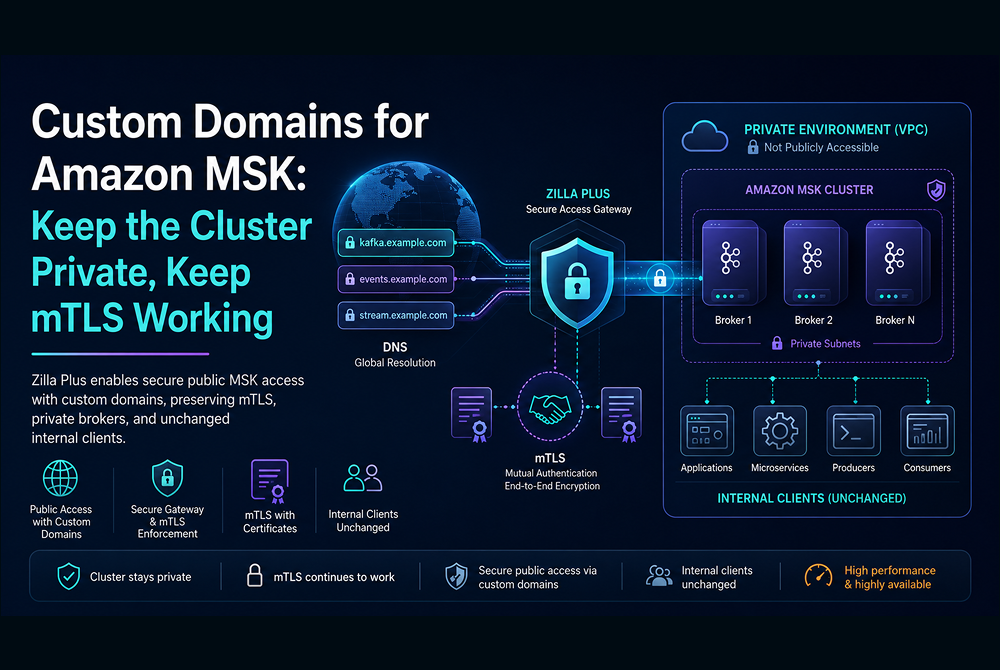


Amazon MSK is private by default, and that's the right call. Kafka was designed inside LinkedIn's data centers fifteen years ago, never intended to be exposed directly to the public internet. When MSK places your brokers inside a VPC and keeps them off the public network, it is matching the protocol's original assumptions about its operating environment.
The trouble starts when reality stops cooperating with those assumptions. You have a partner that needs to publish trade events. A mobile app that wants real-time inventory updates. A SaaS workload running outside your AWS account. Suddenly you need a custom domain in front of MSK — kafka.yourcompany.com — reachable by external clients over the public internet.
There's a widely-shared reference pattern for doing this with a Network Load Balancer. It works, technically. But the way it works has consequences that are easy to miss until you're three sprints in.
Why one NLB listener isn't enough
If MSK were a typical web service, you'd put a load balancer in front, point a custom domain at it, and be done. Kafka doesn't work that way.
A Kafka client opens a bootstrap connection and asks the cluster for metadata. The cluster responds with a list of brokers and tells the client which broker is the leader for each partition. The client then opens direct connections to those specific brokers — because partition leadership is per-broker, and producing or consuming has to talk to the leader. There's no transparent fan-out at the front door. Every broker needs to be individually routable from the client.
So the conventional NLB pattern requires one TLS listener per broker, plus one for bootstrap. For a three-broker cluster that's four listeners. For a fifteen-broker cluster it's sixteen. Every time you scale your cluster, you reconfigure the NLB.
That's the easy part.
The advertised.listeners problem
For external clients to actually use those NLB listeners, the metadata response has to point at them. Internal broker hostnames inside a private VPC are useless to a client out on the public internet. The fix in the conventional pattern is to reconfigure MSK itself — specifically, to change the advertised.listeners configuration so that brokers return the public NLB hostnames in metadata responses.
This is where the hidden costs start to surface.
advertised.listeners is a global property of how the broker presents itself. Every client that fetches metadata gets the same response. Once you've redirected metadata at the NLB, your internal clients — the ones that were happily connecting directly to MSK over the private VPC, with no domain trickery in sight — now also get NLB hostnames back. They have to traverse the NLB on every connection. You've added a hop, added latency, and coupled your internal data path to a piece of edge infrastructure it never needed.
You've also broken mTLS. The NLB terminates TLS to do its job, which means the broker on the other side never sees the client's certificate. If you were enforcing broker ACLs based on the certificate's Common Name — the standard pattern for mTLS-based authorization in Kafka — that enforcement is now silently incorrect. The broker sees a connection from the NLB, not from the client. Per-client identity has been laundered out of the connection by the time it lands on the broker.
The AWS reference for this pattern acknowledges the limitation: mTLS isn't supported by the workaround. That's not a small footnote. It rules out the most common authentication mechanism for external Kafka access in regulated environments.
The published reference architectures, and where they stop
AWS has three reference architectures covering this territory. Each is worth reading directly, and each is well-documented enough that its own published limitations carry most of the argument.
Configure a custom domain name for your Amazon MSK cluster is the canonical NLB-per-broker pattern. One TLS listener for bootstrap, one per broker, certificate imported into ACM with SANs for every broker hostname, advertised.listeners reconfigured to point at the NLB. The post is explicit on scope: the solution applies when using SASL/SCRAM authentication only. mTLS isn't supported because the NLB terminates TLS — and the broker therefore never sees the client certificate. For Express clusters, the same post notes that the pattern "negates the use of Express broker aliases," which is one of the operational simplifications Express was built around. So the SASL/SCRAM solution costs you both mTLS and a piece of the value of moving to Express.
Configure a custom domain name for your Amazon MSK cluster enabled with IAM authentication is the IAM variant of the same architecture. NLB topology is identical, the advertised.listeners rewrite is automated by a provided script, and the limitations compound rather than relax. IAM authentication uses SigV4-signed requests, which means clients need AWS credentials to connect — partners running outside AWS need IAM Roles Anywhere or a similar STS-based workaround before they can authenticate at all. The post's own FAQ documents a more fundamental constraint: advertised.listeners was removed as a dynamic broker config in KRaft-based Kafka, so the solution "is only supported in Zookeeper-based MSK clusters." Zookeeper mode is on its way out; this architecture has a sunset built in. The same FAQ also walks through diagnostic procedures for an "unexpected broker id" error caused by misconfigured advertised.listeners ports — a fragility that's structural, not incidental, given how much manual configuration the pattern requires.
How Goldman Sachs builds cross-account connectivity to their Amazon MSK clusters with AWS PrivateLink is a different shape of solution for a different problem. It uses AWS PrivateLink to expose MSK across AWS accounts using either a dedicated NLB and VPC endpoint per broker (Pattern 1) or a single shared NLB with per-broker advertised ports (Pattern 2). It's well-suited to its stated use case — cross-account access within AWS, with overlapping CIDRs and a low-trust micro-account model — and Goldman Sachs chose Pattern 1 specifically to avoid touching advertised.listeners. But PrivateLink connections originate inside AWS VPCs. There's no path for clients running on premises, in another cloud, or in a partner's environment to consume the service this way. The post itself notes the per-broker cost (around $37.80 per broker per month before data charges) and that managing the topology at scale "requires additional engineering effort" in the form of automation. Worth noting too that AWS has since shipped MSK multi-VPC private connectivity, which simplifies the in-AWS cross-account case — but it's still AWS-only.
The common thread across all three is that they're working around Kafka's protocol semantics at L4 rather than into them. Each treats metadata-driven broker addressing as a constraint to route around, which is why each ends up either rewriting advertised.listeners, multiplying NLB listeners and endpoints, or both. A protocol-aware proxy doesn't have to make that trade.
What's actually missing
The reason this gets awkward is that an NLB is a TCP load balancer being asked to do a job that requires understanding the Kafka protocol — specifically, understanding metadata responses and being able to rewrite them on the fly. NLBs can't do that, because NLBs aren't Kafka.
What the architecture is missing is a Kafka-protocol-aware proxy layer. Something that can sit at the edge, terminate external connections, authenticate clients, and forward natively to brokers that remain private on the back end. Without that layer, you end up doing networking gymnastics at the L4 level to approximate what the protocol semantics actually require.
The Zilla Plus alternative
The Zilla Plus gateway speaks Kafka natively on both sides of the connection. When an external client opens a bootstrap connection through the gateway and asks for metadata, the gateway forwards the request to MSK, receives the real internal metadata response, and rewrites it to advertise the gateway's own endpoints back to the client. The client then connects to broker-specific gateway endpoints, the gateway forwards those connections to the corresponding internal brokers, and the protocol semantics are preserved end to end.
A few things follow from this that matter operationally. mTLS keeping working end to end is the headline, but it's only part of the story.
Only one NLB is required, and it doesn't terminate anything — it forwards packets through to a stateless autoscaling group of gateways. Scaling up and down is straightforward, and the NLB itself stays simple.
MSK's advertised.listeners configuration doesn't change. Internal clients keep connecting directly to MSK exactly as they did before. There's no coupling between your custom domain edge and your existing data plane, and no impact on existing integrations.
The custom domain's TLS server certificate stays managed in AWS Certificate Manager. That isn't free for a software gateway — ACM doesn't expose private keys for public certificates, which is why it integrates smoothly with AWS-managed load balancers and awkwardly with everything else. Zilla Plus closes the gap through first-class integration with AWS Nitro Enclaves: the gateway delegates the private-key operations of the TLS handshake to the enclave, which uses the ACM-managed key to answer the cryptographic challenges without ever revealing the key material to the gateway process. The certificate stays in ACM, issuance and rotation stay an AWS concern, and you get TLS termination at your own gateway without your software ever holding the private key.
mTLS works the way it's supposed to. The gateway terminates the external TLS handshake, validates the client certificate against your CA, and propagates the client's identity — the Common Name from the certificate — through to MSK as the principal on the broker-facing connection. ACLs at MSK enforce against the real client identity, not the gateway's. The same audit trail you'd get from a direct connection is intact.
Because the gateway understands Kafka semantics, it can do things an NLB structurally can't: validate message schemas before they reach the broker, enforce per-client policies and rate limits, expose the same MSK topics over REST or Server-Sent Events or MQTT for clients that don't speak Kafka, and produce per-client telemetry on the way through. You get one consistent point for identity, integrity, and observability across all of your external access patterns.
At a glance
¹ The IAM-authentication blog post states the solution is "only supported in Zookeeper-based MSK clusters" because advertised.listeners is no longer a dynamic broker config in KRaft. The same root cause applies to any pattern that rewrites advertised.listeners.
The shape of the choice
The NLB-per-broker pattern is the kind of solution that looks reasonable on a whiteboard and acquires sharp edges in production. It works for static clusters with simple authentication and no internal clients that mind the extra hop. As soon as you need mTLS, or you have direct-to-MSK workloads you don't want to perturb, or you start scaling brokers regularly, the costs accumulate.
A protocol-aware proxy layer is additive. MSK stays private and unchanged. Existing clients keep working. External access becomes a property of the edge, not a property of the cluster. That's the boundary where this kind of complexity belongs.
Find out more
If you'd like to dig into the deployment specifics — TLS termination, mTLS identity propagation, NLB topology, and the configuration that ties it together — the Zilla docs on Secure Public Access walk through the full reference architecture.
To deploy Zilla Plus directly into your AWS account, search for Zilla Plus for Amazon MSK on AWS Marketplace. CloudFormation templates are included for a one-click subscribe, with first-class infrastructure-as-code support via AWS CDK and CDKTF for teams that prefer to manage their deployments in code.
Related Resources

Ready to Get Started?
Get started on your own or request a demo with one of our data management experts.

Explore pricing
Straightforward, usage-based pricing with no per-connection surprises — start free and scale when you are ready.


Join the Community
Trade notes with the engineers running Zilla in production, and get help from the team in Slack or Discord.