Kafka, Kafka Connect, and Schema Registry as Native MCP Tools
Zilla exposes Kafka, Kafka Connect, and Schema Registry operations as MCP tools, letting AI agents read, inspect, publish, and manage live Kafka data like any other tool.

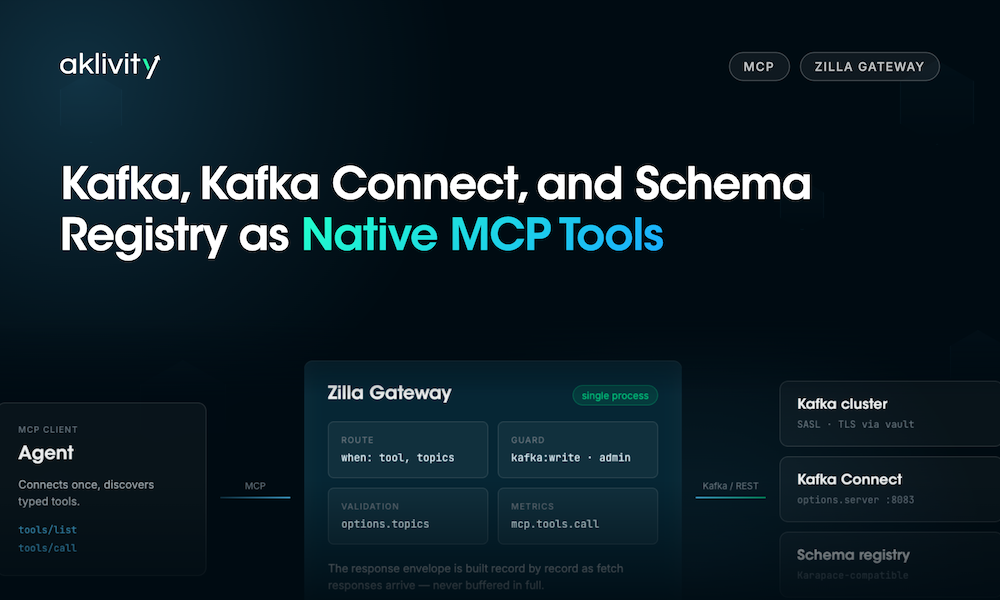


AI agents increasingly need to read from and act on live Kafka data: sampling recent messages, checking a consumer group, publishing an event, registering a schema.
Zilla ships three binding types, mcp-kafka, mcp-kafka-connect, and mcp-schema-registry, that expose those operations directly as Model Context Protocol tools, so an agent calls Kafka the same way it calls any other tool.
What MCP Adds for Agents Talking to Kafka
MCP standardizes how a model discovers and invokes tools, resources, and prompts exposed by a server. An agent connects once and gets a list of callable tools with typed inputs and outputs.
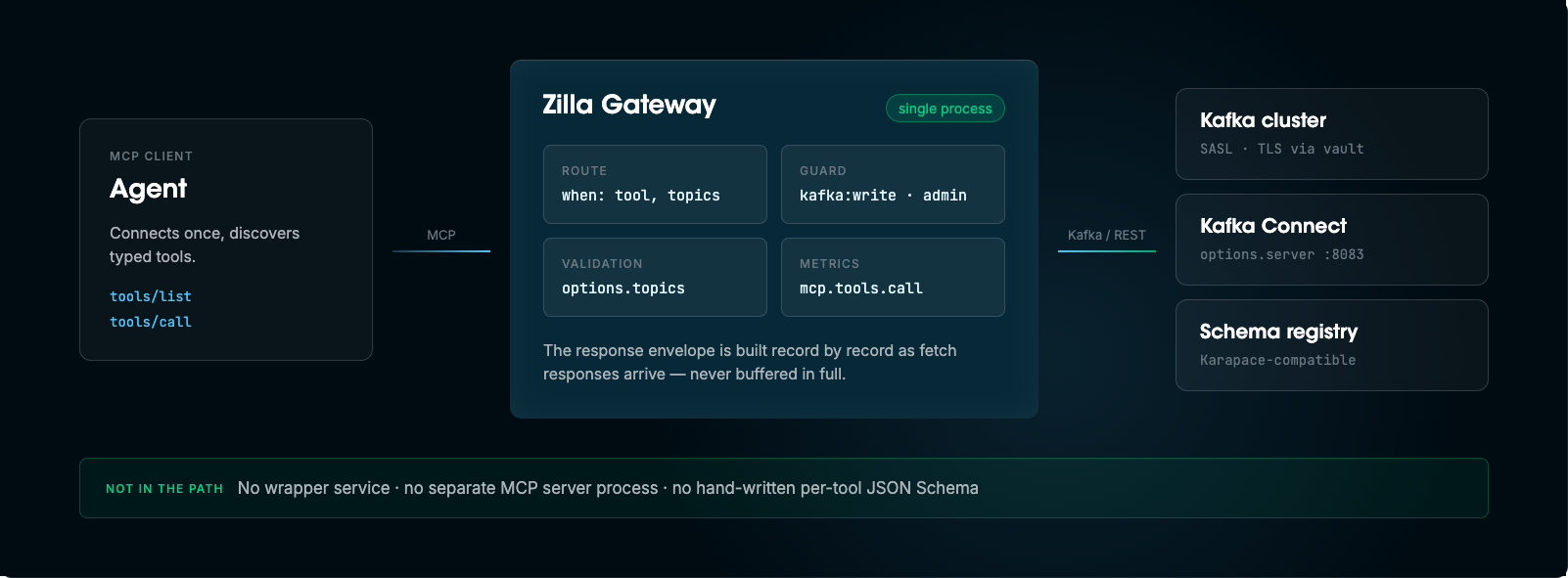
For Kafka, that means an LLM client can list topics, inspect a consumer group, or produce a message without a developer writing and maintaining a custom function for each of those actions.
What the mcp-kafka Binding Does
mcp-kafka is a Zilla binding type that connects an MCP client directly to a Kafka cluster. According to the binding reference, it exposes Kafka broker operations as a fixed set of intrinsic MCP tools, without an upstream MCP server, an OpenAPI spec, or hand-written per-tool schemas in between.
There's no wrapper service to deploy and no separate MCP server process to keep in sync with the cluster. The binding speaks Kafka wire protocol on one side and MCP on the other, inside the same Zilla engine.
The Full Kafka Tool Set
Zilla’s mcp-kafka binding exposes multiple kafka tools, covering the major APIs for the data path, topic lifecycle, metadata discovery and consumer groups:
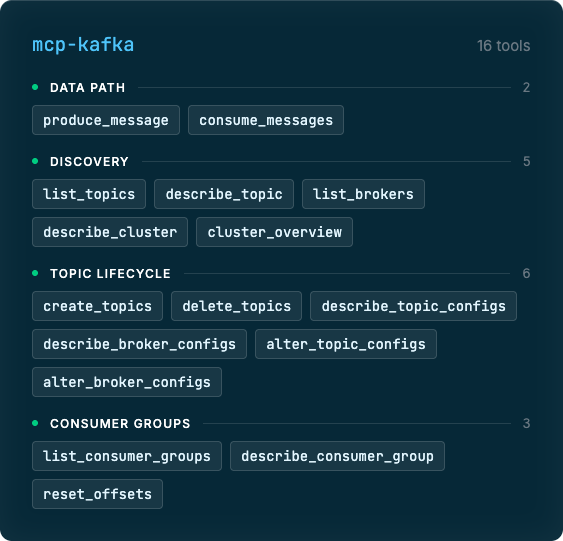
Every tool is fixed and intrinsic to the binding, an operator doesn't write JSON Schema for these by hand.
What an operator does control, in configuration, is which of these tools a given caller can even see, which is what most of this post is about.
The Shape of a Tool Call
A consume_messages call takes topic, and optionally partition, offset, and limit. A produce_message call takes topic, key, value, optional partition, and optional headers as an array of name/value pairs:
{
  "name": "produce_message",
  "arguments": {
    "topic": "orders",
    "key": "order-4471",
    "value": "{\"status\":\"shipped\"}",
    "headers": [{ "name": "trace-id", "value": "9f2c1e" }]
  }
}
Group-scoped tools like describe_consumer_group and reset_offsets take a group_id instead of a topic. A consume_messages response comes back as a standard MCP result envelope, a structuredContent object carrying the topic, the matched records (each with key, value, partition, offset, timestamp, and headers), and a count, alongside a short human-readable content summary and an isError flag:
{
  "structuredContent": {
    "topic": "orders",
    "messages": [
      {
        "key": "order-4471",
        "value": "{\"status\":\"shipped\"}",
        "partition": 0,
        "offset": 1200,
        "timestamp": 1732541223000,
        "headers": [{ "trace-id": "9f2c1e" }]
      }
    ],
    "count": 1
  },
  "content": [{ "type": "text", "text": "Fetched 1 message from orders." }],
  "isError": false
}
An agent, or the model behind it, can read structuredContent programmatically without re-parsing the summary text.
Streamed Responses, Not Buffered Ones
That result envelope isn't assembled in memory and then written out. The binding builds it record by record as Kafka fetch responses arrive off the wire, streaming each matched message directly into the MCP response as it's read.
That matters once consume_messages is pointed at a busy topic instead of a toy one. A limit of a few hundred records on a high-throughput topic doesn't require the binding to hold that batch in memory before it can start replying, which keeps tool-call latency and memory use predictable regardless of message volume.
Configuring the Binding
A minimal Zilla configuration points the binding at a Kafka bootstrap server and routes a tool call to it:
bindings:
  mcp_kafka_client:
    type: mcp-kafka
    kind: client
    options:
      servers:
        - kafka.examples.dev:9092
    routes:
      - when:
          - tool: produce_message
options.topics can also declare per-topic key and value types, so the binding validates a produce_message payload against that schema before it reaches the broker, rather than letting a malformed message land on the topic.
The binding also runs as a proxy kind, routing tool calls through exit to an existing Kafka client binding elsewhere in the configuration rather than dialing a cluster directly:
bindings:
  mcp_kafka_proxy:
    type: mcp-kafka
    kind: proxy
    routes:
      - exit: kafka0
        when:
          - tool: produce_message
Restricting Which Tools and Topics Are Reachable
A route's when clause matches on tool name, a list of names, or a glob:
routes:
  - when:
      - tool: [produce_message, consume_messages]
  - when:
      - tool: "list_*"
For produce_message and consume_messages, the same clause also scopes the route to specific topics or a topic glob:
routes:
  - when:
      - tool: produce_message
        topics: [orders]
An agent can be handed a tool named produce_message without ever being able to reach a topic outside that list. A second route with a different topics value, or none at all, can be layered in for a different guard.
Authorizing Tools by Role
Routes can require a guard, so a tool is only reachable with the right credential:
routes:
  - when:
      - tool: [create_topics, delete_topics]
    guarded:
      my_guard:
        - kafka:admin
  - when:
      - tool: produce_message
        topics: [orders]
    guarded:
      my_guard:
        - kafka:write
  - when:
      - tool: consume_messages
        topics: [orders]
Reads on orders are open to any caller the binding accepts, writes to orders require kafka:write, and topic administration requires kafka:admin. The same tool name resolves to different capability depending on which guarded route matches.
Connecting Securely to Kafka
options.authorization names one or more credential sets, each with a mechanism, plain, scram-sha-1, scram-sha-256, scram-sha-512, or oauthbearer, paired with a username/password for SASL or a token for OAuth:
options:
  servers:
    - kafka.examples.dev:9092
  authorization:
    my_auth:
      credentials:
        mechanism: plain
        username: my_username
        password: my_password
Pairing the binding with a vault negotiates TLS to the brokers. With neither set, it connects over plain TCP, which is fine for a local cluster but not for anything an enterprise agent should be pointed at in production.
Kafka Connect Operations Through the Same Pattern
mcp-kafka-connect applies the same intrinsic-tool approach to a Kafka Connect worker's REST API, connecting to options.server with no OpenAPI spec or MCP server in between.
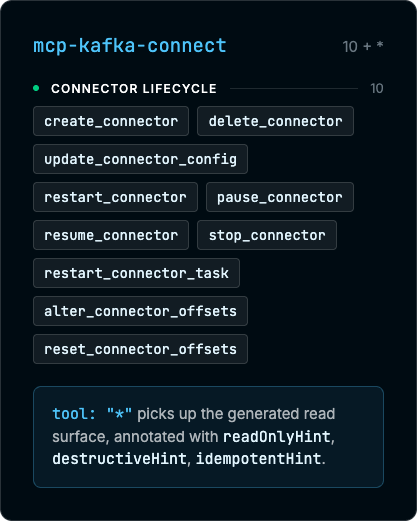
A wildcard route (tool: "*") picks up the rest of the Connect REST surface, generated from Connect's OpenAPI description, covering read operations like listing connectors or reading a connector's config and status. Every generated tool carries readOnlyHint, destructiveHint, and idempotentHint annotations, so an agent, or a human reviewing its tool calls, can tell inspection from remediation before a call fires:
bindings:
  mcp_kafka_connect_client:
    type: mcp-kafka-connect
    kind: client
    options:
      server: http://kafka-connect.examples.dev:8083
    routes:
      - when:
          - tool: [create_connector, delete_connector, update_connector_config,
                    restart_connector, pause_connector, resume_connector,
                    stop_connector, restart_connector_task,
                    alter_connector_offsets, reset_connector_offsets]
        guarded:
          my_guard:
            - kafka-connect:admin
      - when:
          - tool: "*"
Lifecycle changes require kafka-connect:admin; everything else, including status and config reads, is open.
Schemas as MCP Tools: mcp-schema-registry
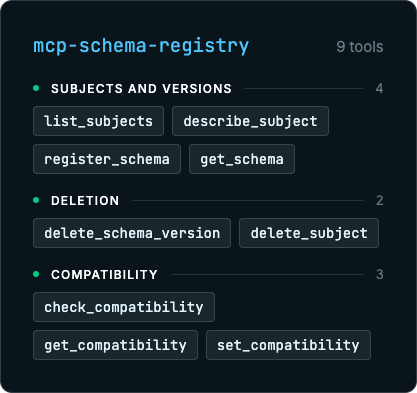
mcp-schema-registry completes the set, connecting to a Karapace-compatible schema registry and exposing its operations as nine intrinsic tools:
bindings:
  mcp_schema_registry_client:
    type: mcp-schema-registry
    kind: client
    options:
      server: http://karapace-registry.examples.dev:8081
    routes:
      - when:
          - tool: register_schema
        guarded:
          my_guard:
            - kafka-sr:write
      - when:
          - tool: "*"
Reads, list_subjects, check_compatibility, and the rest, are unguarded here; only register_schema requires kafka-sr:write. The same route-and-guard pattern from mcp-kafka carries over unchanged.
One MCP Endpoint for Kafka, Kafka Connect, Schemas, and Everything Else
mcp-kafka, mcp-kafka-connect, and mcp-schema-registry are three upstream types Zilla's MCP gateway can front at once. The same gateway can expose REST APIs described by OpenAPI as tools and proxy to existing MCP servers, all behind a single MCP endpoint an agent connects to.
Tool visibility is scope-based: a caller's JWT scope decides what shows up in tools/list, rather than listing every tool and denying the call afterward. Every MCP method call is also instrumented automatically, producing per-tool metrics like mcp.tools.call and mcp.tools.call.duration, dimensioned by tool and outcome, with no agent-side instrumentation required.
Enterprise Usage Patterns
On-Call Copilots for Consumer Lag
A common pattern is a triage agent that an on-call engineer can hand an incident to: list_consumer_groups and describe_consumer_group to find the stuck group, reset_offsets gated behind an on-call guard to correct it. The guard means the agent can look at every group in the cluster but can only commit an offset change under a role the on-call rotation actually holds, and the resulting mcp.tools.call metrics give a per-tool, per-outcome trail of what the agent touched during the incident.
Self-Service Data Discovery
Platform teams can open list_topics, describe_topic, and a topic-scoped consume_messages to a broader set of internal agents so people can sample real data and inspect partition layout without shell access to a Kafka console or a ticket to the data platform team. Because produce_message and the admin tools simply aren't routed for that guard, there's no separate step to "make it read-only", the write and admin tools are absent from tools/list entirely.
Scoped Write Access for Support Automation
A support copilot that needs to replay or correct an order doesn't need broker-wide produce rights. Routing produce_message with topics: [orders.retry] under a support-specific guard lets that agent trigger exactly one kind of write, to exactly one topic, while every other topic and every other tool stays out of reach regardless of what the agent is asked to do.
Configuration and Schema Governance
describe_topic_configs, describe_broker_configs, and check_compatibility can back a scheduled compliance agent that checks retention, replication, and schema compatibility settings against policy, useful for the kind of configuration drift checks that come up in SOC 2 or PCI-style audits. Because none of the mutating tools, alter_topic_configs, register_schema, set_compatibility, are routed for that guard, the agent can report drift but can't fix it, which keeps audit and remediation as separate roles.
Kafka Connect Fleet Triage
A platform engineering agent given the read side of mcp-kafka-connect, the wildcard-routed status and config tools, can pull a connector's state and recent task failures during an incident without credentials to restart or delete anything. Widening its guard to include restart_connector or restart_connector_task for a specific rotation turns the same agent from read-only triage into supervised remediation, one tool at a time.
Who Decides What an Agent Can See
Across all three bindings, topic- and tool-level access control lives in configuration, not in the agent's code, and ties into whatever guard and scope model an organization already runs. What's left to the operator is the mapping itself: which roles and scopes correspond to which tools, and which topics, subjects, or connectors each of those grants can reach.
See the mcp-kafka, mcp-kafka-connect, and mcp-schema-registry binding references. Check out Zilla on GitHub, for the full set of options, and please considering starring ⭐ the repo!
Related Resources

Ready to Get Started?
Get started on your own or request a demo with one of our data management experts.

Explore pricing
Straightforward, usage-based pricing with no per-connection surprises — start free and scale when you are ready.


Join the Community
Trade notes with the engineers running Zilla in production, and get help from the team in Slack or Discord.